Showing posts with label Windows 10. Show all posts
Showing posts with label Windows 10. Show all posts
Tuesday, August 4, 2015
Windows 10 IoT RTM
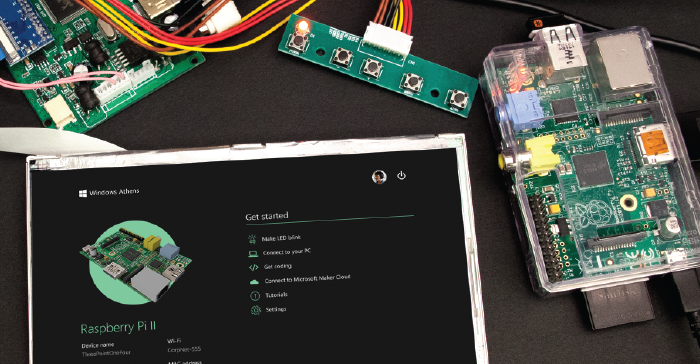
Windows 10 IoT RTM has been pushed to Microsoft Servers.
You can download ISO right now
x86 for Minnowboard Max
ARM for Raspberry Pi II

Windows 10 Build 10224

Flighting information for fbl_impressive (current preview branch for Windows Insiders). Last update 10th July
 Canary Ring 10224
 OSG Ring 10208
 External Ring 10166
Canary Ring 10224OSG Ring 10208External Ring 10166New build 10224
10th July
The fbl_impressive continues to get new builds as we are getting so close from RTM. This time Canary Ring is now testing build 10224, OSG build 10208 and Insiders got build 10166 on Fast Ring.Canary Ring gets build 10208 while other branches are getting build 10224
9th July
Microsoft is now finishing Windows 10, but not at all. The most important for Microsoft now is fix all system issues, related with hardware, drivers, resources management and so. This is crucial for RTM release and sign off July 29. That is not it. Microsoft also need to polish all apps like Groove, Outlook Mail/Calendar and so on, that still buggy and layout must be improved, but there is more, at my view some apps lack on features. The good thing is that Microsoft can work on that after the Windows 10 system core is ready and stable, and all apps can be updated at any time through Windows Store. This is the RTM phase and so the builds are updated with +16 units. That's explains the existence of 10192, 10208 and 10224 in a short time. Canary Ring has got build 10208 by side the th1 branch, the Threshold or Windows 10 RTM.
Although, other branches are getting build 10224.
Plus, OSG is testing 10166, a strong candidate for Insiders.
Canary Ring got build 10192
7th July
The fbl_impressive branch, aside other branches, got build 10192, so the Canary Ring has got build 10192. Insiders will get a build this week, the options are 10164, 10166 or 10192. Let's wait and see :)Internal builds 'refreshed' | New build for Insiders this week
7th July
Canary Ring got build 10166 while OSG is testing build 10164. Is also known that Insiders will get a new build which might be 10164 or 10166. Several branches getting build 10166
5th July
Several branches got builds 10165 and 10166 this weekend. Although fbl_impressive stays on build 10164 for Canary Ring, perhaps tomorrow must jump to 10166. Towards the RTM!! Build 10164 was pushed to Canary Ring while Insiders get 10162
2nd July
Microsoft is working hard these days, pushing two daily builds for internal Rings and this week has released three builds for Insiders - you read it right, THREE. Microsoft is on the latest Windows 10 development phase, the 'bug smash'. For example. from build 10158 to 10159 were fixed 300 bugs, just in one day!!At this moment build 10164 was pushed to Canary Ring while Insiders got build 10162 on Fast Ring, perhaps Gabriel Aul mentioned on twitter that this is a strong candidate for Slow Ring too.
There is no time to rest.. build 10162 being tested inside Redmond walls
1st July
Insiders must be really happy, after one month waiting patiently for a new build. On 29th June was released build 10158 for Fast Ring and passed 24 hours another build arrived, the 10159, also for Fast Ring. As a minor build update there is not much new, but was added the official Windows 10 wallpaper plus the login screen was updated. See everything you need to known about this build here. Windows 10 isn't over, it won't be for a long time with regular updates - thats Microsoft plan. With the sign off on 29th July, Microsoft has to get Windows 10 ready one week early, so that OEM can install it on their devices. Also, RTM must be right on the corner and is expected to be released next week. Microsoft can't stop, the job must continue and so new builds came out every day. Right now Canary Ring and OSG are testing build 10162. As Microsoft released two builds in two days, can we expect a surprise very very soon? ;) More builds.. moving forward to 10160
28th June
We are one month to go for the launch of Windows 10 and Microsoft stills have to do a lot of job to make it great. That is definitely crucial so MS clean its image from the past after Windows 8 release, which was a failure, and also make their customers happy.We won't see more features in future builds, and that's why we already know MS will release 2 major updates for Windows including features that couldn't be ready till 29th July. The major work at this moment is finish the UI and fix bugs. At my view, Microsoft is not working at all in the apps, which is understandable as that is the easiest part, plus, all the apps and other features of the OS based on Universal Apps concept can be updated at any moment through Windows Store/Windows Update, which is great.
We are also 1-2 weeks to go from the Windows 10 RTM, will be nice to see how the OS will be at that phase. Some say it is going to release between 10-13th July but that's not official.
For now, we, Insiders, are stuck on build 10130, which is kind of frustrating - besides the 10147 had leak and it seems 10151 and 10154 will leak too. At this phase Microsoft has all the feedback we provided and what they have to do now is in some way independent of our tests/feedback. Plus, releasing a build for Insiders evolves time to test various parameters and Microsoft can't waste time that way.
About flighting information, Canary Ring is on build 10159 while OSG is testing 10158. Meanwhile, the first 10160 builds have shown up, however not for fbl_impressive branch.
Build 10157 arrives on Canary Ring | Partners are testing 10154, which may leak today
26th June
Today the Canary Ring received a new build, 10157. Meanwhile, the branch winmain was updated with 10158.This might be interesting for Insiders, Microsoft Ring, the latest internal ring phase before it came outside Redmond walls, is now testing build 10154, which are signs it might be officially released for Insiders. More than that, Wzor leaked it Release Notes and it says it might grab the ESD and upload it on the Web. In the next hours we may have access to this build. You can follow all the action on this dedicated post.
Gabriel Aul also said, on twitter, that there are good candidates for PC, another sign that a new build for PC is right on the corner.
@j1cordingley @AndreAramis254 We have candidates for both PC and phone builds that look promising. Reviewing issues and deciding soon.— Gabriel Aul (@GabeAul) June 23, 2015Canary Ring gets build 10156 | OSG is testing 10155
25th June
No new builds for Insiders for a long time.. what is Microsoft doing at this moment? The latest build released for Insiders was 10130 and meanwhile, the build 10147 leaked. The fact is everyday a new build shows up on MS database for fbl_impressive branch along all other branches. Currently, the Canary Ring is testing build 10156 and OSG is testing build 10155. Even OSG Ring, that usually get more or less one-two builds weekly, I have noticed that this week every time Canary gets an updated build, the OSG get the build Canary was previously testing. Canary Ring getting daily builds, sometimes 2 builds per day, is not new. What is new, is the fact that OSG is also getting daily updates and any of them are coming to Insiders. This fact may rise some questions... is Microsoft now busy to prepare the RTM, as we are one month to go Windows 10 sign-off, and so Microsoft enlarged the tests to OSG Ring to catch bugs more efficiently? That may explain the fact that Insiders don't get builds for a while... but on the other hand, wouldn't be better for Microsoft to release that builds to the "Real-world" to enlarge the sample and catch more bugs? Still, if OSG is not approving any build for Insiders, may that mean they are unstable?I am going to try to contact Gabriel Aul, the header of Windows Insiders Program and try to know more.
New build 10152 | OSG gets build 10151
19th June
A new build, 10152, was pushed to Canary Ring. Gabriel Aul confirmed that no builds for today. @eHougaard We won't have a new build tomorrow, sorry :-)— Gabriel Aul (@GabeAul) June 19, 2015 Meanwhile, build 10151 is already being tested inside Redmond walls [OSG Ring]Build 10151 pushed to Canary Ring
19th June
Canary Ring just got a new build, 10151 Canary Ring just got a newer build 10150 | OSG is testing 10148 | 10147 leaked
17th June
The two main private Rings, Canary and OSG, got new builds today. The Canary Ring was refreshed with build 10150 while OSG Ring, the internal ring, is testing build 10148. Let's see what will be the next updates to OSG Ring. Usually, when a build stays on OSG for some days, it's a big indication for the next build to Insiders.18th June
If you are tired of waiting for new builds for Insiders, I have good news for you. Windows 10 build 10147 leaked. Check out!!!Build 10147 falls on Canary Ring | Build 10145 being tested internally
14th June
Canary Rings stills getting minor build updates everyday, this time got build 10147. Meanwhile, after a long time build 10134 being tested internally, OSG Ring just got build 10145. Windows Insiders still have to wait for a newer build, but at my opinion, we won't get build 10134 anymore, we must get "fresher" builds. Build 10144 came to Canary Ring
12th June
While Microsoft is pushing build 10130 to Slow Ring, the Windows Insiders may have to wait a little bit more to get a new build on their PC's. It's a bit frustrating as two weeks ago we have heard that build 10134 was a strong candidate and so far it's stills under tests on Microsoft Ring, while the Canary Ring get's daily minor updates and today go the build 10144. The next week is going to be interesting as there is a big possibility for a new Windows Mobile build - 10136 is on OSG Slow Ring. Also, other branches (not fbl_impressive) are getting new builds like 10145 and 10146! More updates soon Build 10143 came to Canary Ring
10th June
One day later after Canary Ring get build 10142, now it got a minor change and pulled up to 10143. Windows Developer Team are testing this build, while OSG is testing 10134Canary Ring gets new build: 10142
While Insiders don't get new builds, after the build 10134 be said to be a very good candidate, Canary Ring has just received a new and fresh build, the 10142. I will keep you updated about new builds and if any information about them leaks :) Windows 10 build 10138 was pushed to Canary Ring
It's Friday, for disappointment of many Windows Insiders, build 10134 wasn't pushed yet for External Ring. While that builds is under tests inside Redmond walls, OSG Ring, the Windows Dev team stills working and today released build 10138 which is now being tested. No more information about this build.Windows 10 build 10136
While I have a post keeping you tuned about build 10134, a serious candidate for Windows Insiders, Windows Developer Team doesn't stop and keeps working on new builds. With official confirmation that Windows 10 will signoff on 29th July, Windows Devs goal at this moment is simple: polish the corners and fix bugs. For disappointing of many Windows fans, you won't see new exciting features for a while. With build 10134 being tested internally [OSG Ring], Microsoft pushed build 10136 to Canary Ring, which in other words, is being tested by Windows Developers team. At this moment, there is not much information about this build, but Gabriel Aul teased two pictures showing some new icons and also Word 97 on Windows 10 :)(click on images to enlarge)


Windows 10.0.0.10138 10138.0.150603-2236.fbl_impressive_CLIENTPRO_RET_x86fre_en-us.esd 10138.0.150603-2236.fbl_impressive_CLIENTPRO_RET_x64fre_en-us.esd 10138.0.150603-2236.fbl_impressive_CLIENTENTERPRISE_VOL_x86fre_en-us.esd 10138.0.150603-2236.fbl_impressive_CLIENTENTERPRISE_VOL_x64fre_en-us.esd download ISO ESD 10138 10143.0.150609-1823 10142 10143 10143.0.150609-1823.fbl_impressive_CLIENTPRO_RET_x86fre_en-us.esd 10.0.0.10152 Windows 10 10152 Windows 10 build 10152 Windows 10 download build 10152 Windows 10 10152 iso download Windows 10 build 10152 iso 10.0.0.10156 Windows 10 10156 Windows 10 build 10156 Windows 10 download build 10156 Windows 10 10156 iso download Windows 10 build 10156 iso 10.0.0.10157 Windows 10 10157 Windows 10 build 10157 Windows 10 download build 10157 Windows 10 10157 iso download Windows 10 build 10157 iso 10.0.0.10158 Windows 10 10158 Windows 10 build 10158 Windows 10 download build 10158 Windows 10 10158 iso download Windows 10 build 10158 iso 10.0.0.10154 Windows 10 10154 Windows 10 build 10154 Windows 10 download build 10154 Windows 10 10154 iso download Windows 10 build 10154 iso windows 10 build 10162 10.0.0.10162 download iso esd what's new known issues gallery new build canary osg ring 10164 10.0.0.10164 build 10164 windows 10 build 10164 iso 10192.0.150706-1700 Windows 10 RTM Threshold
Installing Windows 10 Technical Preview [VHD]

 With the release of Windows 10 Technical Preview, I think is a good shot to explain how to install an OS in a VHD (Virtual Hard Disk). Because this is a Preview, which means it's a beta version, installing this edition as Default and unique OS isn't a good choice at all. Crashes, may happen.
One option is install the Windows 10 TP in a virtual machine. In PC's with lack of memory and fast CPU .. you won't be able to enjoy the real Windows 10.
My suggestion, is to create a new partition and install it there, or even more easier and also secure, install it in a Virtual Hard Disk.
Download Windows 10 TP
Redirect to another post
What is a Virtual Hard Disk?
Virtual hard disk (VHD) is a disk image file format for storing the complete contents of a hard drive. The disk image, sometimes called a virtual machine, replicates an existing hard drive and includes all data and structural elements. It can be stored anywhere the physical host can access.
There are two main types of virtual hard disks: fixed-size and dynamically expanding. Both types have a maximum size value that specifies how large the disk will appear to virtual machines. However, fixed-size VHDs will automatically take up the specified amount of physical disk space on the host computer's file system, whereas dynamically expanding disks will allocate space only as needed.
Advantages of installing Windows in VHD
Significant benefits result from the ability to boot a physical computer from a virtual hard drive:
- Ease of deployment: IT organizations can deploy standardized, 'pre-built' configurations on a single VHD. As an example, software engineering organizations which need a specific set of tools for a particular project could simply 'pull' the appropriately-configured VHD from a network location.
- Backup-and-Restore: Changes to the contents of a VHD (such as infection by a virus, or accidental deletion of critical files) are easily undone.
- Multi-User Isolation: Many current operating systems support having multiple users, but offer varying degrees of protection between them (e.g., one user of the OS could become infected by a virus which infects other users, or make changes to the OS which affect other users). By giving each user their own version of the operating system—say, by creating for each of them a differencing VHD based on a base installation of the OS—changes to any particular child image would have no effect on any of the other child images.
Create and mount VHD
I will work just in CMD (Windows Command Prompt)
- Run CMD
On Windows 8.x, press Windows + S and search for cmd
For older OS you can search for it on Start Menu
 for cmd
 In addition, you can access Prompt by pressing Windows + R and type cmd, then OK
To work with VHD files, I'll use the diskpart tool.
DiskPart.exe is a text-mode command interpreter that enables you to manage objects (disks, partitions, or volumes) by using scripts or direct input from a command prompt. Before you can use DiskPart.exe commands on a disk, partition, or volume, you must first list and then select the object to give it focus. When an object has focus, any DiskPart.exe commands that you type act on that object. [source]
- Once on Prompt, type diskpart to initialize diskpart tool. (require administrator rights
)

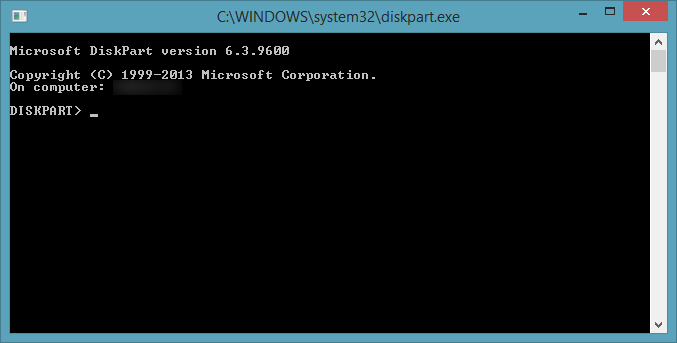 A new window will show up (see more). Now type the following script [change the specifications as you wish like path, size, type ...]
create vdisk file="D:\vdisk.vhd" maximum=40000 type=expandable
attach vdisk
create partition primary
assign letter=m
format
attach vdisk
create partition primary
assign letter=m
format
Remember this is just an example
In the first line, the syntax is based on:
create vdisk file=<file path> [maximum=<size in Megabytes>] |{[type=<fixed|expandable>]
You can also modify the fourth line. There, you tell diskpart which drive letter you want to assign to the volume. In this case, M:
Be careful with the letter you chose. You can get an exception because that letter is already in use. Go to Windows Explorer followed by Computer and take a look for the letters in use. You can't use any of them.

VHD was successfully created and formatted.
WAIK Tools (Windows Automated Installation Kit)
The Windows Automated Installation Kit (Windows AIK) is designed to help original equipment manufacturers (OEMs), system builders, and corporate IT professionals deploy Windows onto new hardware. The Windows AIK is a set of deployment tools supporting the latest release of Windows. This guide describes the methods, tools, and requirements for deploying Windows. [source]
Because we just need imagex, is ridiculous download an ISO file with 2Gb or more when imagex actually is a 598kb size file.
There is an app which allow you to download the main tools for Windows Vista/7/8.x including imagex.
Know more about imagex tool


- Copy the folder path of imagex.exe [example: C:\Folder_name]
- In pictures above, the path is a bit extensive and complex to use in command prompt. To avoid any problems, please, copy the imagex.exe to directory C: .(or C:\Sources for example, something simple). The following scripts in this tutorial will present the path C:\imagex.exe (images may not match, I will update them)
- Mount the download ISO file (Windows 10)
In Windows 7 and 8.x, exists an integrated tool in Windows which allow you to mount virtual images. Just right-click on Iso file and click Mount. If that option is not available, use thirdly-part software like UltraIso, Deamon Tools ...
- Run cmd as administrator
On Windows 8.x, press Windows + S and search for cmd. Right-click and press Run as Admin
Works the same way for older OS. On Start Menu, search for cmd and Run as Admin
, search for cmd and Run as Admin- Type the location imagex.exe
cd _folder path of imagex_
Example: cd C:\
Example2: cd C:\Folder
(ignore the considered path on image)

- Type
imagex /apply _ISO mounted path\sources\install.wim_ 1 _VHD assigned letter_
Example: imagex /apply f:\sources\install.wim 1 m:
The base structure is
imagex /apply image_file image_number image_name image_path
image_file : Specifies the name and the location of the volume image applied to the directory.
image_number : Specifies the number that references the specific volume within the .wim file.
image_path : Specifies the file path where the image will be applied.
Wait a few minutes for completation


Adding a VHD to native boot
- Run cmd as administrator
On Windows 8.x, press Windows + S and search for cmd. Right-click and press Run as Admin
Works the same way for older OS. On Start Menu, search for cmd and Run as Admin
, search for cmd and Run as Admin- Type
bcdboot _vhd assigned letter_\Windows
Example: bcdboot M:\Windows
Concluding
Now, restart your PC. Boot to Windows 10 Technical Preview and finish installation
[pictures and more support coming soon]
Windows 10 Technical Preview Product Key
NKJFK-GPHP7-G8C3J-P6JXR-HQRJR
Office 2016 Touch Preview

 Earlier today, Microsoft pushed out a preview of the Office touch apps for the Windows platform. One of the requirements to try out these apps is to have Windows 10 installed. You can get those apps by clicking the icons below, it will redirect you to Windows Store Online
  Word Preview
 PowerPoint Preview
 Excel Preview
Windows 10 Licence Numbers
The official version of Windows 10 system will launch a total of seven different versions: Home, Mobile Edition, Professional Edition, Enterprise Edition, Education Edition, Mobile Enterprise Edition, IOT core version. Beside the many editions available, there is too licensing channels. On this post, still under construction, are listed some explanations about licensing channels, licence numbers for Retail channels, and an alternative KMS activation procedure to activate both Windows 10 Pro and Enterprise. Any question leave a comment below. Also, feedback about licence keys you used.

Know more about licensing channels
When it comes to purchasing licences there are a number of different channels that you can purchase through. These are FPP (Full Packaged Product), OEM (Original Equipment Manufacturer) and Volume Licensing. So what are the key differences between the channels, and what impact do they have on your licensing rights?
Full Packaged Product
FPP licences are purchased from retail and provide a quick and convenient way for customers requiring less than five licences to purchase their software. Those licences can be upgrade or full licences. On FPP licences, we can differentiate two "sub" channels.
OEM
OEM software is software that comes pre-installed when you purchase a new computer. So for instance when you purchase a new PC it might come with an OEM licensed copy of Windows 8.1 Pro pre-installed on it. One of the key benefits of this is that you then know that the software has been installed correctly and is working properly and if there are any issues it is the responsibility of the computer manufacturer or installer to provide support rather than Microsoft.
Volume
There are a number of volume licensing agreements you can purchase through and these agreements have been tailored to suit the differing requirements of all sizes and types of organisation. There are agreements aimed at the small to medium sized business in the form of Open and Open Value, and agreements aimed at medium to large organisations in the form of the Select Plus and Enterprise Agreements.
Sources [TechNet UK Blog | Microsoft Support]
Retail and Evaluation keys
Below is a list of keys for all Retail/EVAL Windows 10 Editions.
To apply those licences, run the Command Prompt as admin and enter the following script. In addition, I recommend you to restart your Windows after all.
S Eval: 7TNX7-H36JG-QFF42-K4JYV-YY482
S N Eval: D3M8K-4YN49-89KYG-4F3DR-TVJW3
Eval: VPMWD-PVNRR-79WJ9-VVJQC-3YH2G
*Eval is Evaluation licence
Activate Windows 10 Pro and Enterprise with KMS
Not tested yet... leave feedback
To activate this Windows 10 editions, run the command line as admin. You can do it by holding Windows key + X, and click hover Command Prompt (Admin)
Enter the following script
Professional
Information about Windows licensing status
**IGNORE** C:\Windows\system32>slmgr /dlv C:\Windows\system32>slmgr -dli
Uninstalling a licence number
It might be useful for you to know how to uninstall a key, specially if it stops working as it should and you want to try another activation process. First of all, we need the Activation ID. Open the command prompt as admin as run the following script

Manually take note of Activation ID might be painful for lazy people :P
Here it is a possible workaround. In fact, you can extract the Script output to a text file. Running the command prompt as admin an entering the following sequence does the job.
cscript C:\Windows\System32\slmgr.vbs /dlv > C:\[file name]
Here it is an example
Now browsing to C:\ you will find the test.txt file, open it and you will have the full script. You can now copy the Activation ID
To uninstall the prodcut key, run the next command

Read more »

Know more about licensing channels
When it comes to purchasing licences there are a number of different channels that you can purchase through. These are FPP (Full Packaged Product), OEM (Original Equipment Manufacturer) and Volume Licensing. So what are the key differences between the channels, and what impact do they have on your licensing rights?
Full Packaged Product
FPP licences are purchased from retail and provide a quick and convenient way for customers requiring less than five licences to purchase their software. Those licences can be upgrade or full licences. On FPP licences, we can differentiate two "sub" channels.
- Retail It includes a copy of the software that includes all the features the product is supposed to have.
- Evaluation Software typically is only available as a download. Evaluation software contains a mechanism that counts down to an expiration date after you install the software
OEM
OEM software is software that comes pre-installed when you purchase a new computer. So for instance when you purchase a new PC it might come with an OEM licensed copy of Windows 8.1 Pro pre-installed on it. One of the key benefits of this is that you then know that the software has been installed correctly and is working properly and if there are any issues it is the responsibility of the computer manufacturer or installer to provide support rather than Microsoft.
Volume
There are a number of volume licensing agreements you can purchase through and these agreements have been tailored to suit the differing requirements of all sizes and types of organisation. There are agreements aimed at the small to medium sized business in the form of Open and Open Value, and agreements aimed at medium to large organisations in the form of the Select Plus and Enterprise Agreements.
Sources [TechNet UK Blog | Microsoft Support]
Retail and Evaluation keys
Below is a list of keys for all Retail/EVAL Windows 10 Editions.
To apply those licences, run the Command Prompt as admin and enter the following script. In addition, I recommend you to restart your Windows after all.
slmgr /ipk [licence number goes here]
Enterprise
N Eval: MNXKQ-WY2CT-JWBJ2-T68TQ-YBH2VS Eval: 7TNX7-H36JG-QFF42-K4JYV-YY482
S N Eval: D3M8K-4YN49-89KYG-4F3DR-TVJW3
Eval: VPMWD-PVNRR-79WJ9-VVJQC-3YH2G
*Eval is Evaluation licence
Education N: 84NGF-MHBT6-FXBX8-QWJK7-DRR8H
Education: YNMGQ-8RYV3-4PGQ3-C8XTP-7CFBY
Education: YNMGQ-8RYV3-4PGQ3-C8XTP-7CFBY
Core: YTMG3-N6DKC-DKB77-7M9GH-8HVX7
Core N: 4CPRK-NM3K3-X6XXQ-RXX86-WXCHW
Core Single Language: BT79Q-G7N6G-PGBYW-4YWX6-6F4BT
Core Country Specific: N2434-X9D7W-8PF6X-8DV9T-8TYMD
Core N: 4CPRK-NM3K3-X6XXQ-RXX86-WXCHW
Core Single Language: BT79Q-G7N6G-PGBYW-4YWX6-6F4BT
Core Country Specific: N2434-X9D7W-8PF6X-8DV9T-8TYMD
Professional: VK7JG-NPHTM-C97JM-9MPGT-3V66T [Working]
Professional N: 2B87N-8KFHP-DKV6R-Y2C8J-PKCKT
**All N editions don't include media-related technologies like Windows Media Player or Camera. Know more
Professional N: 2B87N-8KFHP-DKV6R-Y2C8J-PKCKT
**All N editions don't include media-related technologies like Windows Media Player or Camera. Know more
Activate Windows 10 Pro and Enterprise with KMS
Not tested yet... leave feedback
To activate this Windows 10 editions, run the command line as admin. You can do it by holding Windows key + X, and click hover Command Prompt (Admin)
Enter the following script
Professional
slmgr /skms kms.xspace.in
slmgr /ipk W269N-WFGWX-YVC9B-4J6C9-T83GX
slmgr /ato
Enterpriseslmgr /ipk W269N-WFGWX-YVC9B-4J6C9-T83GX
slmgr /ato
slmgr /skms kms.xspace.in
slmgr /ipk NPPR9-FWDCX-D2C8J-H872K-2YT43
slmgr /ato
slmgr /ipk NPPR9-FWDCX-D2C8J-H872K-2YT43
slmgr /ato
Information about Windows licensing status
**IGNORE** C:\Windows\system32>slmgr /dlv C:\Windows\system32>slmgr -dli
Uninstalling a licence number
It might be useful for you to know how to uninstall a key, specially if it stops working as it should and you want to try another activation process. First of all, we need the Activation ID. Open the command prompt as admin as run the following script
slmgr /dlv

Manually take note of Activation ID might be painful for lazy people :P
Here it is a possible workaround. In fact, you can extract the Script output to a text file. Running the command prompt as admin an entering the following sequence does the job.
cscript C:\Windows\System32\slmgr.vbs /dlv > C:\[file name]
Here it is an example
cscript C:\Windows\System32\slmgr.vbs /dlv > C:\test.txt
Now browsing to C:\ you will find the test.txt file, open it and you will have the full script. You can now copy the Activation ID
To uninstall the prodcut key, run the next command
slmgr /upk [activation ID]
Windows 10 System Requirements

With Windows 10 right on the corner, coming in 29th July (official), Microsoft finally confirmed it system requirements. As expected, the basic hardware requirements are pretty much the same for Windows Vista, 7 and finally 8.
- Processor: 1 gigahertz (GHz) or faster processor or SoC
- RAM: 1 gigabyte (GB) for 32-bit or 2 GB for 64-bit
- Hard disk space: 16 GB for 32-bit OS 20 GB for 64-bit OS
- Graphics card: DirectX 9 or later with WDDM 1.0 driver
- Display: 1024x600
If you have a PC running Windows 7 or later is very probable you can also run the next giant Microsof's Operative System.
Plus those very basic requirements, to take full advantage of Windows 10 features you will need some extra specs and Cortana, for example, is limited to some regions [for now..]!
- Cortana is only currently available on Windows 10 for the United States, United Kingdom, China, France, Italy, Germany, and Spain.
- Speech recognition will vary by device microphone. For better speech experience you will need a
- High fidelity microphone array
- Hardware driver with Microphone array geometry exposed
- Windows Hello requires specialized illuminated infrared camera for facial recognition or iris detection or a finger print reader which supports the Window Biometric Framework.
- Continuum is available on all Windows 10 editions by manually turning “tablet mode” on and off through the Action Center. Tablets and 2-in-1’s with GPIO indicators or those that have a laptop and slate indicator will be able to be configured to enter “tablet mode” automatically.
- Music and Video stream through the Xbox Music or Xbox video available in certain regions. For the most up to date list of regions, please go to Xbox on Windows website.
- Two factor authentication requires the use of a PIN, Biometric (finger print reader or illuminated infrared camera), or a phone with WiFi or Bluetooth capabilities.
- Device Guard requires:
- UEFI Secure Boot with 3rd party UEFI CA removed from the UEFI database
- TPM 2.0
- Virtualization Support configured on by default in the System Firmware (BIOS)
- Virtualization extensions (e.g. Intel VT-x, AMD RVI)
- Second Level Address Translation (e.g. Intel EPT, AMD RVI)
- IOMMU (e.g. Intel VT-d, AMD-Vi)
- UEFI BIOS configured to prevent unauthorized user from disabling Device Guard hardware security features
- Kernel mode drivers need to be Microsoft signed and compatible with hypervisor enforced code integrity
- Only available on Windows 10 Enterprise
- The number of applications that can be snapped will depend upon the minimum resolution for the application.
- To use touch, you need a tablet or a monitor that supports multi-touch (more info)
- Microsoft account required for some features
- Internet access (ISP fees might apply)
- Secure boot requires firmware that supports UEFI v2.3.1 Errata B and has the Microsoft Windows Certification Authority in the UEFI signature database
- Some IT administrators may enable Secure Logon (Ctrl + Alt + Del) before bringing you to the log in screen. On tablets without a keyboard, a tablet with the Windows button maybe required as the key combination on a tablet is Windows button + Power button.
- Some games and programs might require a graphics card compatible with DirectX 10 or higher for optimal performance
- BitLocker To Go requires a USB flash drive (Windows 10 Pro only)
- BitLocker requires either Trusted Platform Module (TPM) 1.2, TPM 2.0 or a USB flash drive (Windows 10 Pro and Windows 10 Enterprise only)
- Client Hyper-V requires a 64-bit system with second level address translation (SLAT) capabilities and additional 2 GB of RAM (Windows 10 Pro and Windows 10 Enterprise only)
- Miracast requires a display adapter which supports Windows Display Driver Model (WDDM) 1.3, and a Wi-Fi adapter that supports Wi-Fi Direct
- Wi-Fi Direct Printing requires a Wi-Fi adapter that supports Wi-Fi Direct and a device that supports Wi-Fi Direct Printing
- To install a 64-bit OS on a 64-bit PC, your processor needs to support CMPXCHG16b, PrefetchW, and LAHF/SAHF
- InstantGo works only with computers designed for Connected Standby
- Device encryption requires a PC with InstantGo and TPM 2.0.
Windows 10 Redstone

Windows 10 will launch on July 29, but Windows 10 won't finish yet as Microsoft is already working on a new update for it operating system. The codename of the next major update is known as Redstone and will be release on 2016 in two waves. The first wave is targeted to arrive in June of 2016 and the second wave is scheduled for October of the same year. These waves will be trialed with Windows Insiders ahead of their release to the general population.
Mary Jo Foley reported that Redstone will be delivered automatically to Windows 10 users as part of the regular update process but that Redstone will be larger than the typical update and will provide new functionality.
There is no much information about Redstone, but we can expect a lot of features that Microsoft hasn't implemented yet on Windows 10 Threshold.
10508.0.150724-1537.th2 | July 25, 2015
10506.0.150720-1853.th2 | July 21, 2015
10505.0.150718-1249.th2 | July 18, 2015
10504.0.150715-1825.th2 | July 16, 2015
10503.0.150713-1858.th2 | July 14, 2015
10501.0.150708-1754.th2 | July 9, 2015
10500.0.150706-1800.th2 | July 7, 2015
10506.0.150720-1853.th2 | July 21, 2015
10505.0.150718-1249.th2 | July 18, 2015
10504.0.150715-1825.th2 | July 16, 2015
10503.0.150713-1858.th2 | July 14, 2015
10501.0.150708-1754.th2 | July 9, 2015
10500.0.150706-1800.th2 | July 7, 2015
Windows 10 RTM

This is an exciting month for all Windows fans with the release of the promising Windows 10. With the new Microsoft OS's signing off 29th July and after several months of build tests inside and outside the Redmond walls, the OS is "completed" this week. This means no more features will be added, the structure of the OS is mainly done. Although, Windows 10 is not done at all; it's necessary to do some tweaks, polish some corners and fix some instability issues that may be found at any moment
Release date for RTM
Microsoft announced, July 9, they won't release RTM this week. Meanwhile, a possible schedule of the RTM "evolution" has leaked.
RTM SignOff schedule
July 1 - start
July 6 - rtm1
July 9 - rtm2
WPC - Worldwide Partner Conference
July 16 - rtm3
July 19 - deadline1
July 24 - deadline RTM final
July 6 - rtm1
July 9 - rtm2
WPC - Worldwide Partner Conference
July 16 - rtm3
July 19 - deadline1
July 24 - deadline RTM final

RTM is showing up on Microsoft Database!!!
Microsoft Database continuous to "get refreshed" with new builds for various branches as we get close of RTM release. There is lab branch named 'th1' which extends to Threshold 1, the codename of Windows 10.
| Build version | Date |
| 10240.16384.150709-1700 | 10th July |
| 10224.16384.150708-1812 | 9th July |
| 10176.16384.150705-1526 | 6th July |
| 10176.16384.150705-0552 | 5th July |
| 10163.0.150701-1220 | 1st/2nd July |
Subscribe to:
Posts (Atom)